

개요
클린룸 또는 자체 관리되는 대상 고객 세그먼트를 보유한 소매업체는 고객 및 세그먼트 데이터를 동기화하여 주요 광고주 및 일반 대상 고객을 위한 맞춤형 대상 고객 전달을 지원할 수 있습니다. 이 통합 방식은 CDP를 사용하여 고객 및 세그먼트 정보를 API 또는 파일 방식으로 Epsilon에 제공하는 것을 포함합니다.
통합 요구 사항
- 표준 온사이트 통합에는 가능한 모든 관련 터치포인트에 고객 ID가 포함되어야 합니다(제공 가능한 경우).
- 고객 ID 피드는 API 또는 파일 피드 방식으로 제공되어야 합니다.
- 세그먼트 피드는 API 또는 파일 피드를 통해 제공되어야 합니다.
작동 방식
CDP 또는 오디언스 플랫폼은 파일 업로드 또는 API를 통해 Epsilon에 세그먼트 데이터를 제공합니다. 광고 요청에 포함된 고객 ID는 대상 고객 세그먼트 및 관련 캠페인과 매칭됩니다. 이를 통해 사용자 지정 또는 일반 대상 고객 정의를 기반으로 한 정밀한 타겟팅이 가능합니다.
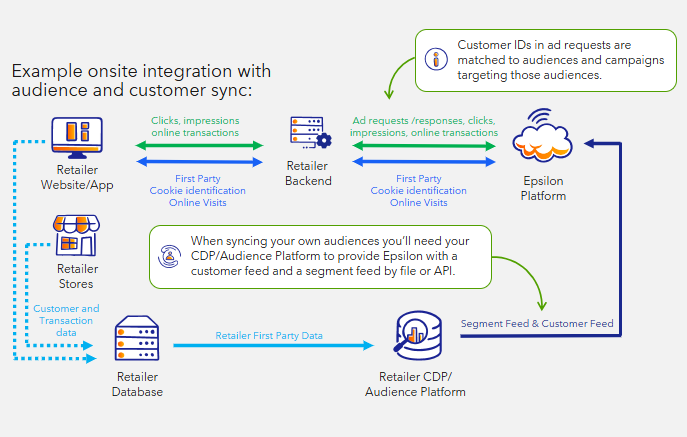
통합 사례
광고 요청 예시: 고객 ID가 포함된 광고 요청:
POST $BASE_URL/v1/ads/generate HTTP/1.1
accept: application/json
content-type: application/json
Authorization: Basic <API_KEY>
{
    "customerId": "wertg5432a",
    "sessionId": "ec9-4e07-881d-3e9",
    "dtmCookieId": "AAAF8xLBTA968AB6TOthAAAAAAE",
    "placement": "search",
    "catalogId": "628dbe95-2ec9-4e07-881d-3e9f92ab2e0b",
    "searchTerm": "chocolate",
    "options": {
        "filterMode": "AndOr"
    },
    "maxNumberOfAds": 3
}
Your ad request must containcustomerId, regardless of if you are integrating via file or API.
피드 파일 동기화 통합 (권장)
파일을 통해 고객 및 세그먼트를 동기화하려면 두 개의 파일이 필요합니다.
- 세그먼트 파일
- 고객 파일
세그먼트 파일
세그먼트 파일은 UI에 표시되는 세그먼트 ID, 이름 및 설명을 제공하는 데 사용됩니다. 또한 세그먼트를 볼 수 있는 특정 team_ids를 지정할 수 있어 특정 광고주를 위한 세그먼트를 큐레이팅할 수 있습니다.
| segment_id | 이름 | 설명 | team_ids |
|---|---|---|---|
| general-segment-1 | 고액 소비 고객 | 주간 평균 구매액이 상위 15%에 해당하는 고객 | |
| general-segment-2 | 가치 지향 고객 | 가치 지향 상품 구매 비중이 높은 고객 | |
| general-segment-3 | 반복 쇼핑 고객 | 평균적으로 매주 쇼핑하는 고객 | |
| custom-segment-1 | 사용자 정의: 최근 BrandCo 구매 빈도가 높은 고객 | 지난 30일 내 BrandCo를 구매한 고객 | ["a5166fc4-f874-4741-a721-c05ffd9941a5","92f4b91f-0089-4102-b13b-6015da8e0174"] |
View the Segment Reference Guide here.
고객 파일
고객 파일은 개별 고객을 생성하고 세그먼트에 연결하는 데 사용되며 다음을 제공해야 합니다: customer_id 및 segment_ids
| customer_id | 세그먼트 |
|---|---|
| cust_12345 | ["general-segment-3", "general-segment-4"] |
| cust_67890 | ["general-segment-3"] |
View the Customer Reference Guide here.
고객당 최대 100개의 세그먼트를 포함할 수 있습니다.고객당 100개 이상의 세그먼트를 동기화하려면 Epsilon에 문의하십시오. 고객당 세그먼트가 100개를 초과하는 경우 광고 요청에서 세그먼트 풀링이 감소하고 요청 내 세그먼트가 잘릴 수 있습니다.
API 동기화 통합
API를 통해 고객 및 세그먼트 동기화 시 세 가지 작업을 완료해야 합니다.
- 세그먼트 생성
- 선택 사항: 관리자 세그먼트 액세스
- 고객 생성
- 고객 세그먼트 연결 관리
API를 통한 세그먼트 생성
가장 먼저 해야 할 일은 고객을 연결할 세그먼트를 생성하는 것입니다.
UI에 표시될 세그먼트 ID, 이름, 설명 및 귀하의 소매업체 팀 정보를 제공해야 합니다.
Important: The segments API uses bearer authorisation used by the Partner API. You will need to generate a bearer token and use it. Learn more: Authentication requests.
POST $BASE_URL/v1/segments HTTP/1.1
accept: application/json
content-type: application/json
Authorization: Bearer <API_KEY>
{
  "segment":{
        "segmentId": "general-segment-4",
        "sourceId": "DEFAULT_SOURCE_ID",
        "name": "Value Shoppers",
        "description": "Shoppers that have a higher basket % of value driven products.",
        "retailerTeamId": "13c84def-41cb-4f99-a3fc-6788264f79fe"
  }
}
View the reference for the Create a segment endpoint here.
선택 사항: 세그먼트 액세스 관리
관리 액세스 기능을 사용하여 선택한 광고주가 세그먼트를 확인할 수 있도록 액세스 권한을 부여할 수 있으며 이를 통해 특정 광고주에 대한 세그먼트를 큐레이션할 수 있습니다.
POST $BASE_URL/v1/segments/{id}:manage-access HTTP/1.1
accept: application/json
content-type: application/json
Authorization: Bearer <API_KEY>
{
  "accessTeamIds":[
        "90d5f138-2090-412b-a397-1f59ea6a31b3","1439f6f2-8c43-4ec5-b511-fc153f7d8119"
        ]
}
View the reference for the Manage access to a specific segment endpoint here.
API를 통한 고객 생성
고객 API는 통합 API에서 사용하는 기본 인증 방식을 사용합니다.
POST $BASE_URL/v1/customers HTTP/1.1
accept: application/json
content-type: application/json
Authorization: Basic <API_KEY>
{
    "customers": [
        {
            "id": "cust_12345"
        },
        {
            "id": "cust_67890"
        }
        }
    ]
}
완료되면 고객을 연결할 세그먼트도 생성해야 합니다. 요청당 최대 100명의 고객을 생성할 수 있습니다.
View the specification for the API to Create or update a customer here.
API를 통한 고객 세그먼트 연결
세그먼트를 생성한 후 /customers/manage-segments API를 사용하여 고객을 세그먼트에 연결합니다
POST $BASE_URL/v1/customers/manage-segments HTTP/1.1
accept: application/json
content-type: application/json
Authorization: Basic <API_KEY>
{
    "customerId": "cust_12345",
    "teamId":"13c84def-41cb-4f99-a3fc-6788264f79fe",
    "segments": {
        "segmentIds":[
        "general-segment-4","general-segment-3"
        ]
    }
}이 요청의 팀 ID는 소매점 팀 ID입니다.
View the specification for the API to manage segments and customers here.